


What actually happens between your prompt and the answer?
In this article, you will learn the three roles in every Artificial Intelligence (AI) conversation and the five components of a prompt that actually works.
Why I Am Going Back to the Basics
If you follow AI closely, you may be surprised to see me writing about prompt engineering. Over the past year or so, much of the conversation among AI builders has moved to context engineering:designing everything a model sees before it answers, including system instructions, retrieved documents, tool definitions, memory and conversation history. For teams building AI agents and enterprise applications, that shift is real, and I write about it often.
So why go back? Because most people who use AI every day are not building agents. They are typing into a chat window.
Individuals use these tools in their personal lives to plan a trip, compare insurance options, draft a difficult email or help a child with homework.
Professionals outside technology, in banking and finance, healthcare, education, law, marketing, sales, retail, manufacturing, government and Human Resources (HR), use them to summarize reports, prepare lessons and draft communications.
Even Information Technology (IT) professionals, the people building the advanced systems, still write prompts every day to generate code, debug problems and document their work.
Context engineering does not replace the prompt.It is built around it. The system instruction at the center of every well-engineered context is itself a prompt, and if the fundamentals are weak, no amount of retrieved data or clever tooling will rescue the answer. In the courses I teach outside work, the questions I hear most are still the basic ones: how does this actually work, and how do I ask better? This series answers them.
Generative Artificial Intelligence (Generative AI) is only as good as the prompt you give it. The difference between a vague answer and a useful one is rarely the model. It is almost always the instruction.
You do not need to be a coder to create with AI. You need a clear way of thinking about how to ask. This first article lays that foundation.
What Prompt Engineering Is, and Why It Matters
Prompt engineering is the art and science of crafting instructions (prompts) that guide AI models such as ChatGPT, Claude and Gemini to produce accurate, useful or creative responses. Put simply, it is giving clear instructions to an AI.A prompt can be a statement, a question or an instruction.
Think about ordering food in a restaurant. "I want food" gets you very little. "I want a medium-rare steak, mashed potatoes on the side, and iced tea" gets you exactly what you came for.
AI models work the same way: they rely entirely on the input they receive, so a poorly worded prompt leads to vague, irrelevant or misleading output.
Effective prompt engineering helps you:
Improve the accuracy and quality of responses.
Reduce ambiguity and unintended biases.
Optimize AI-generated content for specific use cases.
Strengthen the model's ability to follow instructions in complex tasks.
The two techniques underneath all of these are clarity and specificity. The applications are broad:chatbots and virtual assistants (customer support, Frequently Asked Questions (FAQ) automation), content generation, data analysis and summarization of research and financial reports, education and tutoring, and code generation and debugging.As models evolve, prompt engineering will keep its central role, and future advances may include automated prompt generation, self-improving prompts and better fine-tuning methods.
What Happens Between Your Prompt and the Answer
Here is the most important mental model for anyone using these tools:when you type a prompt, the model does not understand meaning the way humans do. It is not thinking or reasoning in the human sense. It uses patterns in language it learned during training to predict the next best word or phrase in response to what you wrote. Think of it as a super advanced sentence finisher, one that can complete entire thoughts and stories.
The process runs in seven steps:
You write a prompt, for example: "Tell me a short story about a dragon who wants to be a chef."
The model breaks your sentence into tokens. Tokens are chunks of words or characters: "Tell", "me", "a", "short", "story", "about", "a", "dragon" and so on.
Each token becomes an input for the model, which consumes the tokens one at a time.
The model uses its previous training to predict what comes next. ChatGPT, for instance, was trained on billions of examples from books, websites, articles and Wikipedia.
It looks at your prompt and asks itself, in effect: based on all the text I have seen, what words usually come next after something like this?
It writes the response one word at a time. It picks one word, then uses that new word to help guess the next: "Once...", "upon...", "a...", "time...", "there...", "was...", "a dragon...".
It does not realize that dragons probably do not exist, or that even if they existed, they cannot cook.
That last step is the one leaders should remember. The model produces fluent, plausible text, not verified truth. Your prompt is the main lever you have over what it produces, and there are many knobs for controlling and fine-tuning the output.
The Three Roles in Every AI Conversation
Every exchange with a chat-based AI involves three roles. Understanding them is the difference between asking a question and designing an assistant.
System role
Written by a human, usually the person or team configuring the assistant. It sets the context and behavior for the AI and defines its role, persona and guidelines for responding to user input. Examples: "You are a helpful and friendly AI assistant" or "You are a customer service chatbot." It remains consistent throughout the interaction unless explicitly updated. Think of it as the AI's job description.
User role
Also human. It provides the specific question, request or task the AI needs to address right now, such as "What is the minimum balance in this report?" or "Summarize this report." It changes with each user input and drives the immediate interaction. It is the user's question or instruction to the AI.
Assistant role
This is the Generative AI agent or chatbot. It represents the AI's response, generated from the system prompt and the user's input, for example "The capital of France is Paris" or "Here is a summary of the article." It is dynamic, depending on both the user's prompt and the system prompt's guidelines. It is the AI's reply.
Practice scenario: Try this yourself:
A project manager wants a risk assessment checklist. Write the text for all three roles.
A sample answer:
The system prompt casts the AI as a senior project management consultant with expertise in risk mitigation for large-scale projects.
The user prompt explains they are preparing for a project kickoff meeting and asks for a checklist of key risk assessment items.
The assistant responds with a checklist: define project scope, objectives and deliverables clearly; identify internal and external stakeholders and their expectations; assess resource availability and potential skill gaps; and review budget assumptions and potential cost overruns.
The Anatomy of a Prompt: Five Components
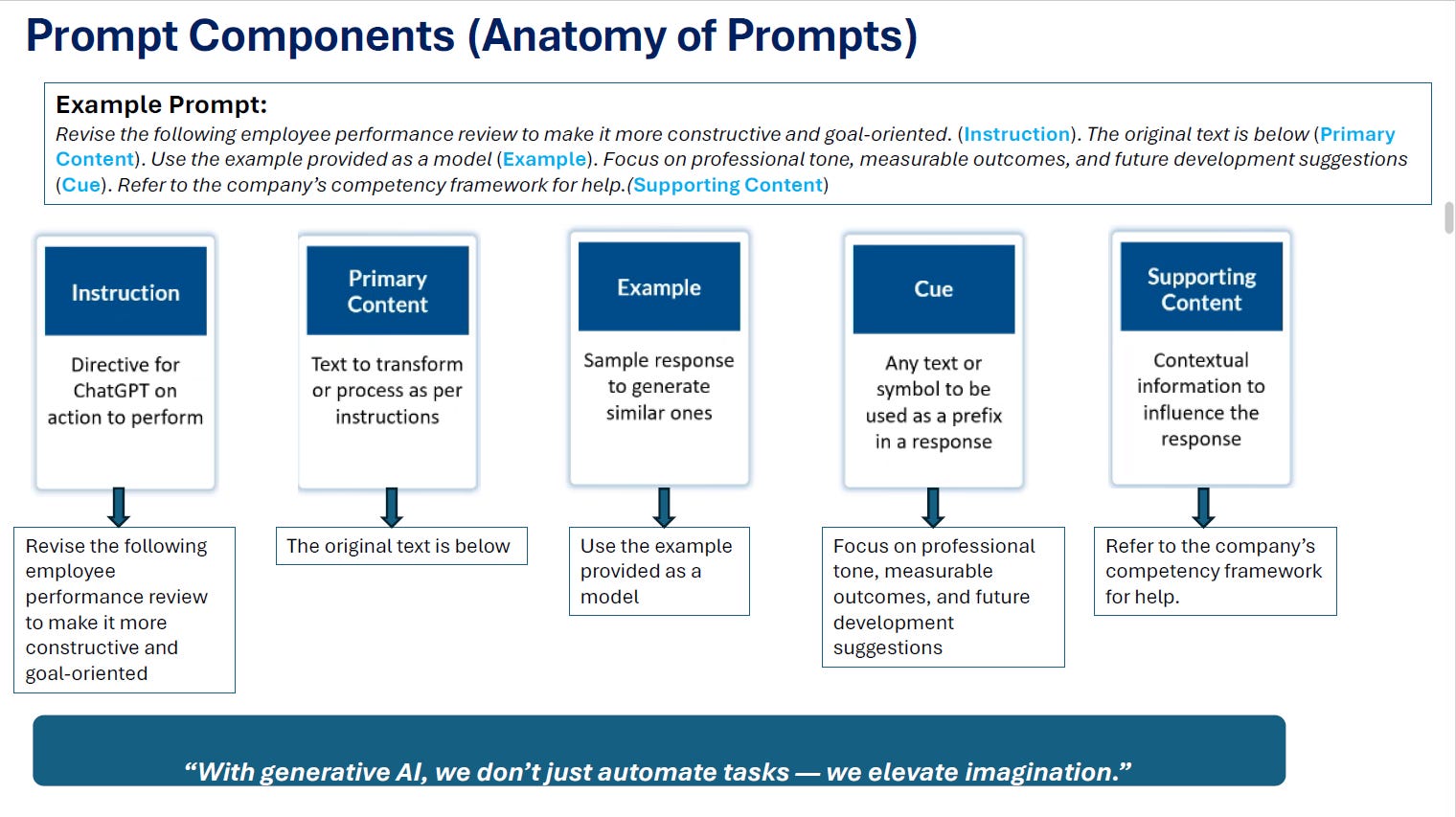
A strong prompt is built from up to five components. Consider this example:"Revise the following employee performance review to make it more constructive and goal oriented. The original text is below. Use the example provided as a model. Focus on professional tone, measurable outcomes, and future development suggestions. Refer to the company's competency framework for help."
This diagram maps each part of that prompt to its component:
Each component has its own variations:
1- Instruction
Can be simple, one direct instruction ("Write an essay on sustainable living"), or complex, several instructions ("Write an essay on sustainable living. Include a short introduction on new events").
2- Primary content
Can be simple (a short sentence to translate), structured (a pattern such as U.S. population figures by year, followed by a question about the average) or unstructured (free-text patient feedback such as "Good experience" or "Not satisfied with service", followed by a request for sentiment analysis).
3- Example
Can be zero-shot (no example), one-shot (one example) or few-shot (two or more examples). We will cover this in depth in the next article.
4- Cue
Can Be:
Absent: "Tell me a joke"
Or Single: "Can you recommend agood Italianrestaurant in the area?"
Or multiple: "I need help planning a trip to Europe. I am interested in visiting Paris, Rome and Amsterdam, and I have abudget of $5,000").
5- Supporting content
Points the model to reference material, for example: "Based on the customer service guidelines provided below, write a response to the following complaint that is empathetic, professional and aligned with our brand tone. Include an offer of resolution. If needed, refer to the official tone-of-voice section in the policy document."
Notice what each part contributes:
The instruction defines the task.
The primary content gives the facts.
The example shows the level of specificity expected.
The cues set tone and format.
The supporting content anchors the output to an internal HR policy.
The same structure works for a lesson plan, a marketing brief, a credit memo summary, a patient education leaflet or a reply to an unhappy customer: the components stay the same, only the content changes.
Key Takeaways
Generative AI is only as good as the prompt you give it: clarity and specificity are the core skills.
Models predict the next word from learned patterns. They do not understand meaning or check facts, so your prompt is your main control.
Every conversation has three roles: system (the AI's job description), user (the request) and assistant (the reply).
A complete prompt can carry five components: instruction, primary content, example, cue and supporting content.
Building prompts component by component turns a vague request into a repeatable, reviewable instruction.
Which of the five components do you see missing most often in the prompts you or your teams write?
Next in this series, Part 2: the 12 prompt types every professional should know, when to use each one, and a short self-test.
Explore more: Start Here · Topics · Archive · About