


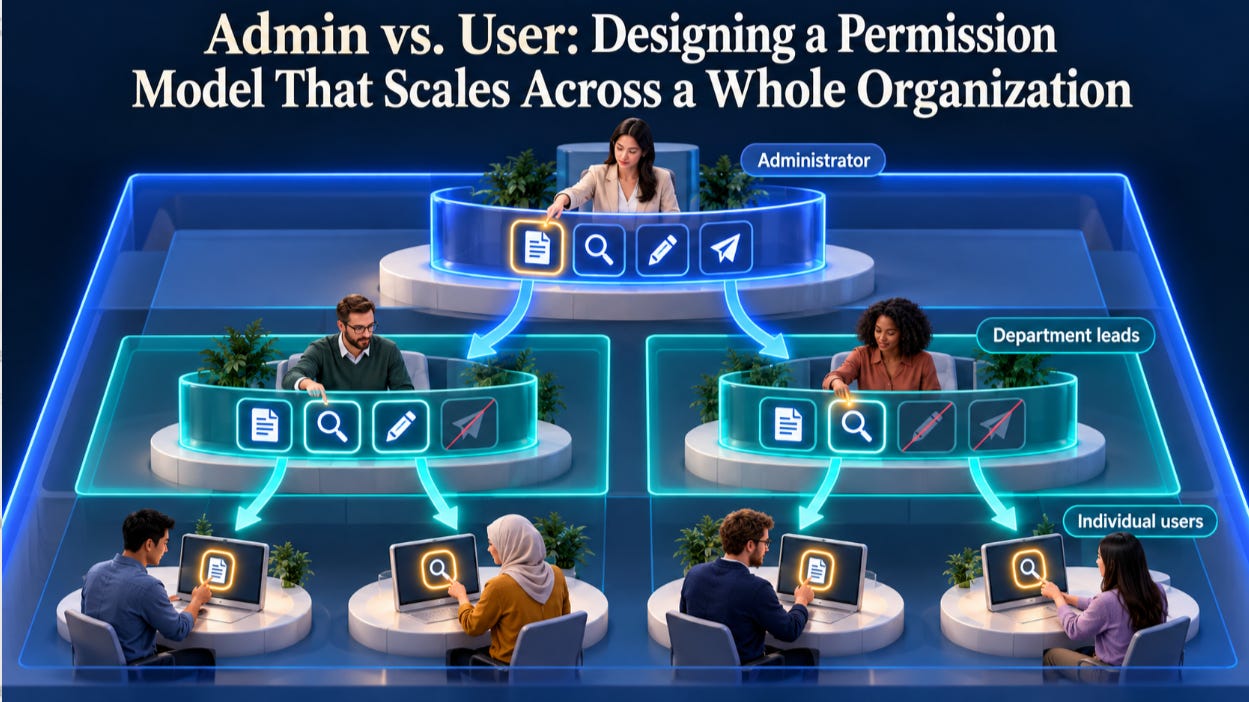
Every Artificial Intelligence (AI) control eventually comes down to a simple question: who gets to decide? The central administrator? The head of a division? The team lead? The individual user? The answer shapes whether AI is safe, whether it is usable and whether a large organization can govern it at all.
A permission model that works for a 50-person company often collapses inside a global enterprise with legal entities, regions, information barriers and thousands of teams. Designing for scale from the start saves painful rework later.
In this article, you will learn:
Why AI strains traditional permission models
How to layer scopes from organization down to individuals
How policies should inherit, tighten and loosen
How to separate administrative roles
How to give users real choice within safe limits
How to prevent permission sprawl
This is guide 7 in a series for people who own or oversee AI controls. The model applies in banking, healthcare, insurance, legal services, retail, education and government.
1. Why AI Strains Traditional Permission Models
New questions: traditional models ask who can open a file. AI adds who can let an assistant read it, summarize it, act on it or send it elsewhere.
New actors: agents act on behalf of people and need their own place in the model.
New boundaries: information barriers, regional rules and client confidentiality must hold even when AI searches across everything.
New speed: features ship monthly, and the model must absorb them without a redesign each time.
New Volume of Data:AI processes massive input data and produces massive output data in record time.
AI does not just need permission to see. It needs permission to read, reason, act and share.
2. Layer the Scopes
Most large organizations need several layers, each able to set policy for the layers beneath it:
Organization: firm-wide rules that apply to everyone, such as which AI features exist at all.
Legal entity or region: rules driven by local law or regulators, such as data residency.
Division or department: rules reflecting business risk, such as stricter limits for a trading desk or a clinical unit.
Team or group: rules for specific projects, matters or client engagements.
Individual: personal choices within whatever the layers above allow.
Policy should flow the way the organization actually works, from the firm to the person.
3. Decide How Policies Inherit
Inheritance rules are where most permission models succeed or fail. Make them explicit:
Inherit by default: lower layers start with the policy of the layer above.
Tighten freely: any layer can make rules stricter for itself and below.
Loosen only with permission: relaxing a rule requires authority from the layer that set it.
Lock when needed: some rules, such as regulatory requirements, can be locked so no lower layer can change them.
Resolve conflicts predictably: when rules collide, the most restrictive applies, and administrators can see why.
Picture an insurer. The organization allows AI summarization of documents. The European entity locks data residency to the European Union. The claims division tightens further and blocks AI from reading medical attachments. A claims team handling a sensitive litigation file blocks AI entirely for that matter. Each layer did its job, and the result for any individual is predictable and explainable.
Clear inheritance turns thousands of settings into one understandable system.
4. Separate Administrative Roles
One all-powerful administrator is a risk and a bottleneck. Split the work:
Global administrator: sets organization-wide policy and delegates authority.
AI policy administrator: manages AI features, models and usage rules.
Connector administrator: approves and configures integrations with other systems.
Delegated administrator: manages policy for one division, region or team.
Auditor: reads policies and logs but cannot change them.
Separation of duties matters here. The person who approves a sensitive connector should not be the only one who can review its logs.
Share the keys wisely. No single administrator should hold every one.
5. Give Users Choice Within the Ceiling
The administrator sets the ceiling; the user chooses within it. Good user-level design includes:
Personal settings: users can turn allowed features on or off for their own work.
Clear explanations: when something is unavailable, users see why and who decided.
Request paths: users can ask for access, and the request reaches the right administrator.
Visibility: users can see what AI can access on their behalf.
This matters more than it seems. When a researcher at a university asks why the assistant cannot read a shared folder, a message that says "blocked by your department's research data policy, request access from the department administrator" turns frustration into a two-minute fix. A silent failure turns it into a support ticket and a loss of trust.
Administrators need control they can prove. Users need control they can understand.
6. Prevent Permission Sprawl
Permission models decay over time unless they are maintained:
Assign to groups, not individuals: individual exceptions multiply quickly and are hard to review.
Use role templates: standard bundles for common jobs keep policies consistent.
Show effective permissions: let administrators see the final result of all layers for any person or agent.
Expire exceptions: temporary grants should end automatically.
Review regularly: remove permissions and exceptions nobody uses.
Every exception is a small debt. Review them before the interest compounds.
7. Test the Model Against Real Organizations
Before finalizing a model, walk real organizational structures through it:
A global bank with legal entities in many countries, information barriers between research and trading, and regional data rules.
A hospital network with clinical and administrative staff, research units and strict patient privacy.
A law firm with ethical walls between client matters.
A university with faculty, staff, students and research partners who all need different defaults.
A model is only proven when it survives the most complicated organization you serve.
Conclusion: Key Takeaways
A scalable permission model lets large organizations govern AI without drowning in settings and lets users benefit from AI without crossing boundaries they cannot see.
Expand permissions beyond viewing to reading, reasoning, acting and sharing.
Layer scopes from organization to individual.
Make inheritance explicit: inherit, tighten, loosen with permission and lock.
Separate administrative roles and duties.
Give users choice within the ceiling, with explanations and request paths.
Fight permission sprawlwith groups, templates and regular reviews.
Whether you serve a bank, a hospital, a law firm or a university, the same structure works: clear layers, clear inheritance and clear accountability.
Structure is what lets freedom scale safely.
What is the hardest permission boundary your organization has had to enforce for AI? Share it in the comments.
Explore more: Start Here · Topics · Archive · About